
Creating engaging videos is one of the biggest challenges for marketers, content creators, educators, and business owners. A good video can explain a complicated concept, demonstrate how a product works, or communicate an idea more effectively than a long block of text.
However, producing animated videos traditionally requires a combination of graphic design, animation, video editing, voiceovers, and considerable time. Hiring professionals can also make video production more complicated, particularly for people who need to publish content regularly.
This is where InstaDoodle aims to make a difference.
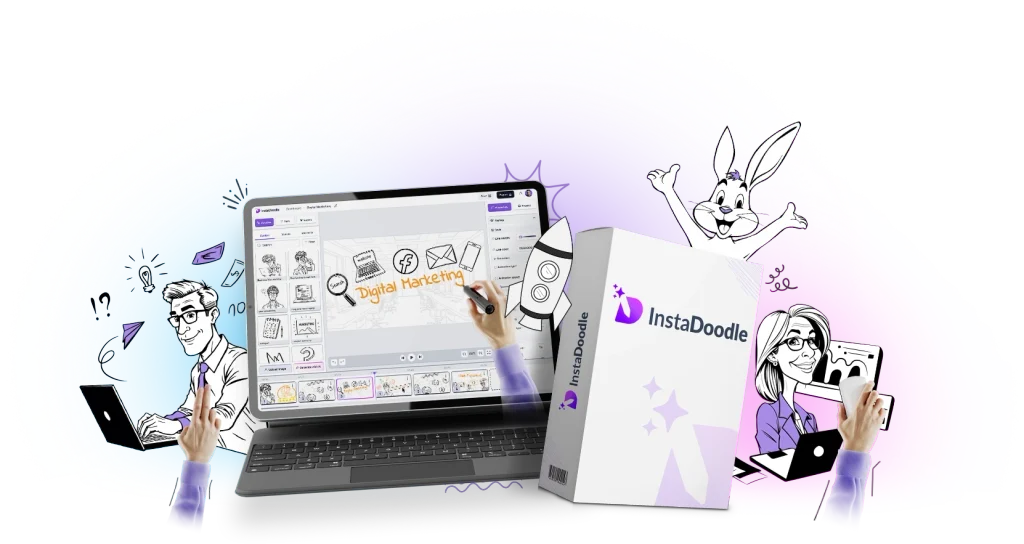
InstaDoodle is a cloud-based whiteboard animation and doodle video creation platform that combines AI-powered image generation, ready-made visual assets, animation effects, templates, and editing tools. It is designed to help users create explainer videos without needing extensive animation or video editing experience.
But is InstaDoodle genuinely useful, or is it another AI tool that promises more than it delivers?
In this comprehensive InstaDoodle review, we will examine how the software works, its main features, potential benefits, practical applications, limitations, and the types of users who may benefit most from it.
What Is InstaDoodle?
InstaDoodle is an online video creation platform focused on whiteboard animations, doodle videos, and animated explainers.
Traditional whiteboard videos often show drawings appearing on a white background as a hand illustrates different elements of a story. This visual style can make educational content, tutorials, product demonstrations, and business presentations easier to follow.
InstaDoodle takes this concept further by incorporating AI-assisted creation and editing tools.
Instead of having to draw every character or search manually for every visual element, users can work with the platform’s built-in doodle library, generate visual elements using text prompts, import their own images, and arrange scenes using the available editing tools.
The platform is designed to simplify several stages of video production, including:
- Creating doodle-style visual elements from text prompts.
- Turning uploaded photos and graphics into sketch-style illustrations.
- Arranging characters, objects, and backgrounds into scenes.
- Adding drawing animations and transition effects.
- Incorporating voiceovers and background music.
- Editing visual elements within the platform.
- Exporting completed videos for different content formats.
The manufacturer presents InstaDoodle as a tool for people who want to create videos without relying entirely on professional animators or complicated desktop software.
Its potential appeal lies in combining several video creation tasks within one browser-based workflow.
However, the quality of the finished video still depends on the clarity of the script, the relevance of the visuals, the scene composition, and the amount of editing performed.
How Does InstaDoodle Work?
InstaDoodle combines AI-generated visual elements with a scene editor and animation tools.
The general workflow involves developing an idea, creating or selecting visuals, arranging the scenes, adding movement and audio, and rendering the finished project.
Step 1: Start With a Video Idea
The first step is to decide what you want your video to communicate.
For example, you might want to explain how a product works, teach a concept, introduce a service, or create a short educational video.
A clearly defined objective makes the rest of the process easier. Before creating the visuals, it helps to have a basic script or outline describing the message you want viewers to understand.
Step 2: Generate or Select Visual Elements
InstaDoodle’s DoodleAI engine is designed to generate doodle-style characters, objects, and other visual elements from text prompts.
You can describe the type of visual you need and use the generated material as a starting point for your scene.
Alternatively, you can choose from the platform’s built-in library of doodle characters, speech bubbles, arrows, props, and other elements.
The library can be useful when you need familiar visual components without generating everything from scratch.
AI-generated elements may need adjustments if the initial result does not match the intended scene. Clear prompts and a willingness to refine the output can help improve the final result.
Step 3: Compose Your Scenes
Once you have your visual elements, the next step is to arrange them into scenes.
This involves positioning characters, adding objects, selecting backgrounds, and organizing the information in a logical order.
For example, a product explainer might begin by presenting a common problem, introduce the product, demonstrate how it works, and conclude with the main benefits.
The purpose of scene composition is to make the video understandable, not merely visually interesting.
Step 4: Add Animation and Transitions
InstaDoodle provides several animation options, including drawing effects, wipes, slides, fades, and pop-in effects.
These can be used to reveal information gradually and guide viewers through the video.
Slide transitions can also help connect scenes and maintain a consistent flow.
The key is to use animation deliberately. Too many effects can distract viewers from the message, while carefully selected movements can make an explanation more engaging.
Step 5: Add Voiceovers and Background Music
Audio can make a video easier to follow, particularly when explaining a process or presenting information.
InstaDoodle supports adding your own voiceover and background music. Its advertised audio features are intended to help users create a more complete video without relying entirely on separate editing tools.
A clear narration can explain what is happening on screen, while background music can establish an appropriate atmosphere.
The voiceover should remain easy to understand, and the music should not overpower the spoken content.
Step 6: Edit and Render the Video
Before exporting, review the scenes for mistakes, unnecessary repetition, awkward transitions, and visual elements that do not match the narration.
The platform includes image-editing tools for tasks such as freehand drawing, filling areas with color, erasing elements, and removing backgrounds.
Once the project is ready, it can be rendered using the platform’s cloud-based workflow.
Cloud rendering can reduce the need to process the entire video locally on your computer. Actual rendering time and the available output options may depend on the project and the platform’s current capabilities.
InstaDoodle Features Reviewed
The following are the main features that make InstaDoodle worth examining.
1. DoodleAI Text-to-Visual Generation
One of InstaDoodle’s central features is its DoodleAI engine.
The idea is straightforward: instead of searching manually for every visual element, users can describe what they want and generate a doodle-style illustration.
For example, someone creating a video about online marketing might need illustrations of a laptop, a customer, a shopping cart, or a business owner.
An educator might need a diagram, a mathematical illustration, or a character representing a particular concept.
AI-assisted generation can help users produce starting points for these scenes without drawing every component themselves.
This can be particularly helpful for people who have ideas for videos but lack illustration skills.
However, AI-generated images may not always match the prompt perfectly. Some results may require regeneration, editing, or replacement with an existing library asset.
The feature should therefore be viewed as a way to accelerate visual creation rather than a guarantee that every prompt will produce a finished, publication-ready scene.
2. A Library of More Than 1,000 Doodle Elements
InstaDoodle advertises a library containing more than 1,000 doodle elements and visual assets.
These include characters, objects, speech bubbles, arrows, and other components that can be incorporated into a video.
A ready-made library can reduce the amount of time spent creating common visual elements.
For example, a tutorial may need a person pointing toward a screen, while a business explainer might need illustrations of a customer, a product, or a delivery process.
Using existing assets can also help maintain a consistent visual style across multiple scenes.
The usefulness of the library depends on whether its assets suit your subject. A creator producing educational or business content may find many familiar elements useful, while someone working in a specialized industry may need to generate or import additional visuals.
3. Photo-to-Doodle Conversion
InstaDoodle includes an AI image-to-sketch feature intended to convert uploaded images into doodle-style illustrations.
This can be useful when you want to incorporate a recognizable image rather than relying exclusively on generic characters.
Potential applications include converting product photographs, logos, custom graphics, and other suitable images into a style that fits a whiteboard animation.
For example, a business could use an illustration based on its own product rather than showing a generic object.
A content creator could also experiment with turning selected photographs into sketch-style elements for storytelling or educational videos.
The final quality depends on the source image and the conversion result. Some images may require background removal or further editing before they fit naturally into a scene.
4. Black-and-White and Color Visuals
Traditional whiteboard animation is usually associated with black-and-white drawings appearing on a plain background.
InstaDoodle also promotes the ability to create colored doodle elements.
This gives users more flexibility when choosing the visual style of their videos.
Black-and-white drawings may suit educational explanations, technical tutorials, or minimalist presentations. Colorful illustrations may be more appropriate for promotional videos, storytelling, children’s educational material, or social media content.
The ability to work with different visual styles can help creators adapt their videos to different audiences.
However, consistency is important. Mixing unrelated illustration styles within one video can make the final result feel disjointed.
5. Multiple AI Art Styles
The platform advertises several AI styles, including caricature, cartoon, and realistic-style visuals.
Different styles can create different impressions.
Caricatures may suit informal or humorous content. Cartoon illustrations can work well for educational storytelling, while more realistic visuals may be useful for certain product demonstrations or business explainers.
The ability to experiment with different styles gives creators additional options when developing a visual identity.
However, the best style depends on the audience, subject, and tone of the message. A playful cartoon style may not suit every professional presentation, just as a realistic illustration may not fit every lighthearted educational video.
6. Built-In Image Editor
InstaDoodle includes an image editor with tools such as freehand drawing, color filling, erasing, and background removal.
This is useful because imported or AI-generated visuals do not always fit a scene perfectly.
For example, an image may have an unnecessary background, an element may need to be removed, or a visual may need a small adjustment before it can be used.
Having editing tools within the same platform can reduce the need to switch between several applications for basic image adjustments.
However, it should not be mistaken for a replacement for a full professional image-editing application when complex retouching or detailed graphic design is required.
7. Ready-Made Project Templates
InstaDoodle advertises more than 14 project templates.
Templates provide a starting point for people who do not want to build every scene from a blank canvas.
They can be especially useful for repeatable video formats, such as tutorials, product explainers, educational lessons, and business presentations.
A template can help establish a basic structure, allowing users to focus on the script and the information being communicated.
However, templates should be customized to suit the message. Using the same layout repeatedly without meaningful changes can make videos feel generic.
8. Multiple Animation Effects
The platform includes several animation types, such as drawing, wiping, sliding, fading, and pop-in effects.
These effects determine how visual elements appear on screen.
A drawing effect can create the familiar impression of an illustration being sketched. A fade can introduce information gradually, while a pop-in effect can emphasize a particular object or idea.
Different effects can be used for different purposes.
For example, an educational video might reveal one part of a diagram at a time, while a product demonstration could use movement to direct attention toward a particular feature.
The most effective animation is usually the animation that helps viewers understand the content.
Excessive movement can create visual clutter, so it is worth prioritizing clarity over the number of effects used.
9. Slide Transitions
Transitions help connect individual scenes.
InstaDoodle advertises effects such as fades, wipes, pushes, and iris transitions.
These can make a video feel more cohesive when used consistently.
For instance, a video could use a simple transition between the problem, solution, demonstration, and conclusion.
However, transitions should support the structure of the video rather than distract from it. A consistent, restrained approach often works better than introducing a different effect every few seconds.
10. Voiceover and Background Music
InstaDoodle allows users to add their own voiceovers and background music.
This is an important feature because animation alone may not communicate every detail clearly.
Narration can explain a diagram, provide context for a visual, or guide viewers through a sequence of steps.
Background music can help establish the mood, but it should remain secondary to the main message.
Creators who prefer to narrate their own videos may appreciate the ability to incorporate their recordings into the project.
The final result will still depend on the clarity of the narration, the quality of the audio, and how well the spoken content aligns with the visual sequence.
11. Multiple Aspect Ratios
Different publishing platforms use different video dimensions.
InstaDoodle advertises support for formats including widescreen, vertical, portrait-style, and square layouts.
This can be helpful when adapting content for different channels.
For example:
- Widescreen video can suit YouTube explainers and presentations.
- Vertical video can suit short-form mobile content.
- Square video can be useful for certain social media placements.
- Portrait formats can suit mobile-first viewing experiences.
The ability to work with different aspect ratios can reduce the need to create every project from scratch.
However, changing the dimensions of a video may require rearranging elements. A layout that works well in widescreen may not automatically look good in a vertical format.
12. Custom Backgrounds
The platform advertises a library of backgrounds, including blackboards, greenboards, blueprint-style designs, and mathematical paper.
These options can help creators tailor the appearance of a video to its subject.
A blackboard background may suit an educational explanation, while a blueprint-style background may fit a technical demonstration.
The right background can provide context without requiring a complicated design.
However, background selection should be guided by readability. Text and illustrations need to remain easy to see, and decorative elements should not compete with the main content.
13. Regenerating Image Variations
The product page describes a feature for generating alternative versions of certain visual elements.
This can be useful when an AI-generated character or object is close to what you want but needs improvement.
Instead of starting the entire scene again, you may be able to generate variations and select a more suitable result.
The feature can help when developing a consistent visual direction, although generated variations may still need manual selection and editing.
14. Cloud-Based Access
InstaDoodle operates as a cloud-based platform.
This means users can work through a compatible web browser without relying on a traditional desktop installation.
Cloud-based tools can be convenient for people who work on different computers or prefer to keep their creative workflow online.
The platform also advertises cloud rendering, which moves the rendering workload away from the user’s local machine.
This can be helpful for creators whose computers are not particularly powerful.
However, a stable internet connection is important, and the experience may depend on browser compatibility, account access, project size, and the service’s performance.
15. Unlimited Video and Project Creation
The product page advertises unlimited video and project creation.
For people who produce content regularly, this can be an important consideration.
A marketer may need several promotional videos for different products, while an educator may develop a series of lessons over time.
A creator producing tutorials may also want to revise older projects or build multiple videos around a single subject.
Before relying on any usage limit claim, it is sensible to review the specific licence and plan terms applicable to your account, including any restrictions on AI credits or particular features.
What Can You Create With InstaDoodle?
InstaDoodle is designed for several different types of video projects. Its usefulness depends on the kind of content you need to produce.
1. Product Promotion Videos
Businesses can use animated videos to explain what a product does, demonstrate how it works, and communicate its main features.
For example, a software company might create a short explainer showing a common customer problem, introducing its product, and demonstrating how the product fits into the customer’s workflow.
A doodle format can help simplify the message and make abstract concepts easier to understand.
However, animation alone does not guarantee sales. The script, offer, audience, and overall marketing strategy remain important.
2. Affiliate Product Review Videos
Affiliate marketers often need to explain products clearly before directing viewers to a merchant’s sales page.
InstaDoodle can be used to create animated review videos that summarize product features, explain potential advantages, discuss limitations, and help viewers understand whether the product fits their needs.
For example, an affiliate review video could introduce a software tool, demonstrate the problem it addresses, explain its main features, and discuss the type of user who may benefit from it.
The video could then be published alongside a written review or used as part of a broader content strategy.
A useful review should provide accurate information rather than making exaggerated promises. For affiliate marketing, clear and balanced content is more valuable than simply creating a visually attractive video.
3. Explainer Videos
Explainer videos are designed to make a concept easier to understand.
They are useful for products and services that require explanation before a potential customer can appreciate their value.
Examples include explaining how a software platform works, introducing a business process, describing a service, or simplifying a technical concept.
InstaDoodle’s combination of visual assets, animation, and narration can help creators present information step by step.
The best explainer videos focus on one central message rather than attempting to cover everything in a single presentation.
4. Educational Videos
Teachers, trainers, and educational content creators can use whiteboard-style animation to present lessons visually.
For example, a video could explain a mathematical equation, demonstrate a scientific process, introduce a historical event, or illustrate a complicated concept.
Visuals can help break information into smaller parts, allowing viewers to follow the explanation at a manageable pace.
The format can be particularly useful when a subject involves processes, sequences, or relationships that are easier to understand through diagrams.
However, accuracy remains essential. Teachers should review all generated visuals and explanations before using them in educational material.
5. Online Course Videos
Course creators often need to produce several lessons covering different topics.
InstaDoodle could be used to create introductory videos, explain concepts, summarize lessons, or add visual variety to a course.
A creator might use animation for the more conceptual parts of a lesson and other video formats for demonstrations or interviews.
This can help create a varied learning experience without requiring every lesson to use the same presentation style.
6. YouTube Content
YouTube creators can use doodle videos for tutorials, explainers, educational stories, product reviews, and selected types of commentary.
The format may be especially useful when the subject can be explained through illustrations rather than relying on footage of a person speaking to the camera.
For example, a channel about business concepts could use simple drawings to explain revenue, profit, customer acquisition, or other topics.
A channel about science or technology could use animated diagrams to demonstrate how a process works.
However, a good video still needs an interesting topic, a strong opening, clear narration, and an effective structure. The animation tool is only one part of the production process.
7. Social Media Videos
Short-form video platforms often reward content that communicates an idea quickly and clearly.
InstaDoodle’s aspect-ratio options and animation tools may be useful for creating short educational clips, promotional messages, and simplified product explanations.
A short doodle video could introduce one useful tip, explain a common mistake, or summarize a particular concept.
For mobile-first content, it is important to keep text readable, avoid overcrowding the screen, and deliver the main point early.
8. Business Presentations
Businesses often need to explain processes, services, proposals, and strategic ideas to employees or customers.
Animated visuals can make a presentation more engaging when they simplify information rather than decorate it unnecessarily.
For example, a company could use a simple sequence of illustrations to explain its service process, customer journey, or product development workflow.
The platform may be useful for people who want to create more visual presentations without building every illustration manually.
9. Training and Onboarding
Training videos can explain workplace procedures, software workflows, internal processes, and customer service practices.
Whiteboard animations may be useful when the subject is procedural and can be represented visually.
For example, a company could create a short video explaining how employees should complete a task or follow a particular process.
These videos can be reused when the information remains relevant, potentially reducing the need to repeat the same explanation during every training session.
10. How-To Videos and Tutorials
Step-by-step content is a natural fit for doodle animation.
A tutorial might show how to complete a process, use a tool, solve a problem, or follow a particular sequence of actions.
Visuals can make the steps easier to follow, while narration provides additional explanation.
This approach can work particularly well when the process involves several stages that can be represented using illustrations.
11. Logo Intros and Branded Content
InstaDoodle can also be used to create visual introductions and short branded sequences.
Businesses and creators may want a consistent style across their content, and an animated logo or introductory sequence can help establish that identity.
However, branding elements should remain brief and relevant. Long introductions can delay the content viewers actually came to see.
12. Videos From Written Articles
Written articles can sometimes be adapted into videos.
For example, an article explaining a process could be reorganized into a script with a visual for each major point.
A long article should not simply be read word for word over a sequence of illustrations. It is usually better to identify the central ideas and rewrite them in a conversational style suited to video.
InstaDoodle can help create the visual component of this process, but script adaptation and editing remain important.
Benefits of Using InstaDoodle
InstaDoodle offers several potential advantages for people who create visual content regularly.
1. You Do Not Need to Draw Every Element Yourself
One of the biggest barriers to animation is the need to create suitable artwork.
InstaDoodle’s AI generation and built-in asset library can help reduce this burden.
Instead of drawing every character, object, or illustration manually, users can start with existing assets or generate new ones.
This can make the format more accessible to people who have ideas for videos but limited illustration skills.
2. It Combines Multiple Creation Tools
Video production can involve several separate applications for illustrations, editing, animation, and audio.
InstaDoodle brings several of these tasks into one workflow.
Having visual assets, animation effects, image editing, and audio tools in the same environment can make routine production more convenient.
However, the platform may not replace every specialized tool, particularly for projects requiring advanced editing, complex motion graphics, or extensive audio production.
3. It Can Help Speed Up Production
Templates, existing doodle assets, AI-generated illustrations, and cloud rendering can reduce the amount of manual work involved in creating certain videos.
This may be especially useful for creators who need to publish content frequently.
For example, someone creating a series of educational explainers could reuse a consistent format and focus on developing the script and selecting appropriate visuals.
The actual time saved will depend on the project’s complexity and how much editing the output requires.
4. It Can Make Abstract Ideas Easier to Explain
Some ideas are difficult to communicate through ordinary footage alone.
Business processes, mathematical concepts, software workflows, and technical explanations may be easier to follow when broken down into illustrated steps.
Whiteboard animation is particularly suited to this style of communication.
InstaDoodle provides tools for creating these visual sequences without requiring users to build every drawing from scratch.
5. It Offers Flexibility for Different Content Types
The platform can be used for educational material, marketing videos, tutorials, presentations, and product explanations.
This flexibility may be useful for people who produce several kinds of content.
A creator might use one project format for short promotional videos and another for longer educational explanations.
The ability to work with different visual styles and aspect ratios adds further flexibility.
6. It Supports Custom Visuals
The photo-to-doodle feature and built-in image editor give users options beyond the standard asset library.
This can help when a project requires a particular product, logo, photograph, or custom visual.
The ability to combine existing assets with custom illustrations can make a video more relevant to the subject.
7. Cloud Rendering Can Reduce Local Processing Requirements
Rendering animated videos can place demands on a computer, depending on the software and project.
InstaDoodle advertises cloud rendering, allowing the platform to handle this process remotely.
This can be useful for people who do not have a powerful computer dedicated to video production.
The experience still depends on internet access and the service’s performance.
8. It Can Help Standardize Repeated Video Production
Businesses and creators often produce multiple videos that follow a similar structure.
Templates, reusable visual styles, and a consistent workflow can make these projects easier to manage.
For example, an educational channel could use a similar introduction, scene structure, and closing format across a series of lessons.
A business could maintain consistent branding across product explainers and training videos.
This can make production more organized, although each video should still be tailored to its subject.
Limitations of InstaDoodle
Although InstaDoodle offers a range of useful features, it is important to understand what the platform can and cannot do.
1. AI-Generated Visuals May Need Editing
AI-generated elements do not always match the intended result perfectly.
A character may look different from what you expected, or a generated object may not communicate the concept clearly.
You may need to refine prompts, generate alternatives, edit the result, or use a different visual asset.
Anyone expecting every idea to turn into a polished video automatically may be disappointed.
2. A Good Video Still Requires a Good Script
The quality of an explainer depends heavily on the information being communicated.
A video with attractive illustrations can still be ineffective if the explanation is confusing, repetitive, or poorly structured.
Before opening the editor, it helps to identify the audience, the main problem, the key message, and the outcome you want viewers to understand.
InstaDoodle can help with visual production, but it does not eliminate the need for thoughtful content planning.
3. It Is Primarily Focused on Doodle and Whiteboard Animation
InstaDoodle is designed around doodle-style video creation.
This is a strength for users who specifically want whiteboard animations, but it may be less suitable for projects that depend on cinematic footage, complex live-action editing, advanced visual effects, or realistic three-dimensional animation.
The best tool depends on the format you need rather than the number of features advertised.
4. Professional Results Still Require Attention to Detail
Automated tools can reduce manual work, but they do not eliminate the need for quality control.
Creators should review the pacing, visual consistency, narration, transitions, spelling, and accuracy of the finished video.
A video that contains too many visual elements or unnecessary transitions may be less effective than a simpler, carefully edited presentation.
5. Cloud-Based Access Requires an Internet Connection
Because InstaDoodle operates online, users need a suitable internet connection to access the platform and work on their projects.
This may be inconvenient in places with unreliable connectivity.
Users should also review how projects are stored, how access works, and what options are available for managing their files.
6. Feature Access and Usage Terms Matter
The product advertises AI credits, visual assets, multiple styles, and different creation tools.
Before relying on a particular feature for a business workflow, check the licence and account terms that apply to it.
It is particularly important to understand any restrictions affecting AI generation, commercial use, rendering, or advanced features.
7. It May Not Replace a Full Professional Editing Suite
InstaDoodle aims to simplify doodle animation and explainer production.
However, a professional editor may still be preferable for projects requiring detailed audio mixing, advanced timelines, sophisticated compositing, complex camera effects, or extensive live-action footage.
InstaDoodle is best evaluated as a specialized creation tool rather than an automatic replacement for every video production application.
InstaDoodle for Affiliate Marketers
Affiliate marketing is one of the areas where a tool such as InstaDoodle may be useful.
Affiliate marketers need to explain products clearly, build trust, and help potential customers understand whether an offer suits their needs.
A written review can provide detailed information, but some audiences may prefer a video summary.
InstaDoodle can help create animated videos that complement written reviews.
Creating Affiliate Product Review Videos
An affiliate review video could introduce a product, explain the problem it addresses, outline its main features, and discuss its advantages and limitations.
Doodle visuals can help illustrate abstract ideas, particularly when reviewing software, online services, educational products, or digital tools.
For example, a review of an email marketing platform could use illustrations to show how a business collects subscribers, sends a campaign, and evaluates the results.
The goal should be to make the product easier to understand, not to make unsupported promises about its performance.
Repurposing Written Reviews
Affiliate marketers often invest time in writing long-form reviews.
Selected parts of a review can be adapted into a video script, allowing the same research to support more than one content format.
The process involves identifying the main points, rewriting them for spoken delivery, and creating visuals that help communicate each idea.
This is generally more effective than simply displaying paragraphs of text throughout the video.
Creating Product Explainers
Some products require more explanation than others.
Software, online tools, and digital services may be easier to understand when their functions are demonstrated through a sequence of visual steps.
An explainer can introduce a problem, show how the product addresses it, and explain its main use cases.
However, the visuals and script should accurately reflect the product. If the video demonstrates a feature, make sure that feature actually exists.
Supporting YouTube and Social Media Content
Affiliate marketers can use short videos to introduce a product category, explain a common problem, or summarize the most important points from a review.
Different aspect ratios can help adapt content to different platforms.
However, publishing more videos does not automatically lead to more sales. Topic selection, audience targeting, video quality, and the relevance of the product all matter.
InstaDoodle for Educators and Course Creators
Educators often need to explain ideas that are difficult to demonstrate through ordinary footage.
A diagram can make a process clearer, while a sequence of drawings can help students understand how different elements relate to one another.
InstaDoodle can be useful for creating these types of educational videos.
Explaining Complex Concepts
A lesson about a scientific process, mathematical relationship, or business concept can be broken into smaller visual stages.
Each scene can introduce one idea, while narration explains the relationship between the different parts.
This approach can help keep the explanation organized and easier to follow.
Creating Consistent Course Lessons
Course creators often need multiple videos with a similar structure.
Templates and reusable visual styles can help maintain consistency across lessons.
For example, each lesson might begin with a question, explain the main concept through illustrations, provide an example, and conclude with a summary.
This can create a more organized learning experience.
Producing Training Material
Businesses and instructors can use animated videos to explain procedures, software workflows, and other repeatable processes.
Once created, the videos may be reused for future learners or employees, provided the information remains accurate.
However, training material should always be reviewed before publication, particularly when incorrect information could cause confusion or operational problems.
InstaDoodle for Small Businesses
Small businesses frequently need promotional content but may not have a dedicated video production team.
InstaDoodle may provide an accessible way to create simple visual explanations of products and services.
Explaining Services
Some services are difficult to communicate through a single photograph.
An animated video can show the sequence of steps involved in delivering a service, the problem it solves, and the type of customer who may benefit.
This can be particularly useful for businesses offering consulting, software, digital services, or specialized processes.
Creating Promotional Content
Businesses can use short animations to introduce an offer, demonstrate a product, or explain a service.
A clear script and relevant visuals are important. The video should focus on the customer’s problem and the value of the solution rather than relying on animation effects alone.
Developing Internal Training Videos
Small businesses may also use the platform for onboarding and internal communication.
For example, a business could create a short video explaining how to use a system, handle a customer inquiry, or follow a standard process.
This can help communicate recurring instructions in a consistent format.
How to Get Better Results With InstaDoodle
The quality of the final video depends on more than the software. The following practices can help improve the result.
Start With One Clear Objective
Decide what viewers should learn or understand by the end of the video.
A video that attempts to cover too many subjects may become confusing.
Focusing on one main objective makes it easier to plan the script, select visuals, and organize the scenes.
Write the Script Before Building the Animation
A script provides the structure for the video.
Write the introduction, main explanation, supporting examples, and conclusion before spending too much time on visual effects.
This helps ensure that the animation supports the message rather than determining the message.
Use Specific Prompts
When generating visuals, describe the object, setting, style, and purpose as clearly as possible.
A more specific prompt can give you a better starting point than a vague description.
If the initial result is unsuitable, refine the prompt or try a different visual asset rather than forcing an image that does not communicate the idea.
Keep Scenes Simple
Each scene should have a clear purpose.
Avoid putting too many characters, labels, and decorative elements on the screen at the same time.
A simple scene often communicates an idea more effectively than a complicated one.
Match Animation to the Message
Use drawing effects when revealing an illustration is useful, and transitions when moving between sections.
Avoid adding movement merely because an effect is available.
The purpose of animation is to guide attention and improve understanding.
Make Narration Easy to Follow
Use short sentences and a natural speaking style.
Technical information may need to be explained in plain language, particularly when the audience is unfamiliar with the subject.
Make sure that the narration matches the visuals and that background music does not interfere with speech.
Review the Entire Video Before Publishing
Watch the final video from beginning to end.
Check for visual inconsistencies, incorrect information, spelling errors, awkward transitions, audio problems, and unnecessary repetition.
If the video promotes a product, verify that all features and claims are accurate.
Is InstaDoodle Easy to Use for Beginners?
InstaDoodle is designed to make doodle video production more accessible to people without extensive animation experience.
Its templates, existing visual assets, AI-assisted generation, and built-in editing tools can reduce the number of tasks that would otherwise need to be completed manually.
Beginners may find this approach more approachable than learning a complex animation application from scratch.
However, easy access to creation tools does not mean every video will look professional automatically.
Users still need to understand how to structure a story, select appropriate visuals, arrange scenes, and edit the final result.
The learning process may be relatively straightforward for simple explainers, while more ambitious projects will require experimentation and practice.
Does InstaDoodle Require Installation?
InstaDoodle is advertised as a cloud-based platform, so it can be accessed through a compatible web browser without a traditional desktop installation.
This can be convenient for users who work across different devices or do not want to maintain a dedicated animation application on their computer.
Cloud-based access can also make the workflow more flexible, although a suitable internet connection is required.
Before starting a substantial project, it is sensible to confirm that your browser and device work well with the platform.
Can InstaDoodle Be Used on Mac and Windows?
The manufacturer describes InstaDoodle as a browser-based platform that can be accessed from different types of computers.
Because it operates online, it is not limited to a traditional Windows-only desktop installation.
The actual experience may depend on the browser, device performance, internet connection, and the requirements of the project.
Users should confirm compatibility with their own setup before relying on the software for important work.
Does InstaDoodle Support Different Languages?
The product is marketed as supporting video creation in multiple languages.
This can be useful for creators who serve audiences in different countries or want to adapt content for different language groups.
However, multilingual video production involves more than generating a visual scene. The script, pronunciation, narration, text displayed on screen, and cultural context all need to be appropriate for the intended audience.
If a project uses AI-generated language or voice features, review the output carefully before publishing.
Does InstaDoodle Offer a Money-Back Guarantee?
The manufacturer advertises a 60-day money-back guarantee.
This may give customers an opportunity to evaluate whether the platform suits their workflow after purchasing it.
However, the guarantee is subject to the seller’s applicable terms and procedures. Review the current refund conditions before making a decision.
A refund guarantee can reduce some purchasing risk, but it does not guarantee that the software will save a particular amount of time or produce a specific business result.
Who Should Consider InstaDoodle?
InstaDoodle may be worth considering for people who want to create doodle-style videos without manually drawing every visual element.
It may be particularly relevant to the following groups.
Content Creators
Creators who regularly publish educational or explanatory content may find the combination of templates, AI visuals, and animation tools useful.
Affiliate Marketers
Affiliate marketers can use it to create product review videos, software explainers, and visual summaries that complement written reviews.
Educators
Teachers and educational creators may benefit from the ability to present lessons through diagrams and animated illustrations.
Course Creators
People developing online courses can use the platform to produce introductory videos, concept explanations, and supplementary lessons.
Small Business Owners
Businesses that need simple product explainers, service introductions, or training material may find the workflow convenient.
Trainers and Consultants
Professionals who frequently explain processes or present information may use whiteboard animations to communicate ideas more visually.
Who Might Not Benefit From InstaDoodle?
InstaDoodle may not be the best fit for everyone.
It is less likely to be suitable for people whose primary requirement is advanced live-action editing, cinematic video production, detailed three-dimensional animation, or sophisticated visual effects.
It may also be unnecessary for users who only create occasional simple videos and already have a workflow that meets their needs.
People who expect AI to produce complete, polished videos without review or editing may also need to adjust their expectations.
The platform is best suited to users who find whiteboard animation useful and are willing to review and refine the generated content.
InstaDoodle Pros and Cons
Pros
- AI-assisted generation of doodle-style visual elements.
- A built-in library of more than 1,000 doodle assets.
- Tools for converting uploaded images into sketch-style visuals.
- Multiple animation effects and slide transitions.
- Templates that provide a starting point for new projects.
- Built-in image editing tools.
- Support for different aspect ratios.
- Options for adding voiceovers and background music.
- Cloud-based access without a traditional desktop installation.
- Potential uses in marketing, education, training, and content creation.
Cons
- AI-generated visuals may need refinement.
- Professional results still require good scripting and editing.
- The doodle-animation focus may not suit every video format.
- Cloud-based access requires a suitable internet connection.
- Complex projects may require additional editing tools.
- The value of the platform depends on how frequently you create videos.
- Users should verify the applicable licence and feature restrictions.
Frequently Asked Questions About InstaDoodle
What is InstaDoodle?
InstaDoodle is a cloud-based whiteboard animation and doodle video creation platform. It combines AI-assisted visual generation, ready-made doodle assets, animation effects, templates, and editing tools.
What can you create with InstaDoodle?
You can use the platform to create explainer videos, educational animations, product promotions, affiliate review videos, tutorials, business presentations, and other types of doodle-style content.
Do I need animation experience to use InstaDoodle?
The platform is designed to be accessible to users without extensive animation experience. Templates, existing visual assets, and AI-assisted generation can help simplify the process.
However, creating an effective video still requires planning, editing, and quality control.
Does InstaDoodle use AI?
Yes. Its DoodleAI engine is designed to generate doodle-style visual elements from text prompts. The platform also advertises tools for converting images into sketch-style visuals.
Can I upload my own images?
The platform advertises image importing and an AI image-to-sketch feature. These tools can help incorporate suitable photographs, logos, and graphics into your projects.
Can I create colored animations?
The manufacturer advertises support for both black-and-white and colored doodle elements. The available options may depend on the features and licence associated with your account.
Can I add my own voiceover?
Yes. InstaDoodle advertises the ability to upload or record your own voiceover and add background music.
Can I create videos for social media?
The platform advertises multiple aspect ratios, including vertical, square, and widescreen formats. These options can help adapt projects to different publishing platforms.
Is InstaDoodle suitable for affiliate marketing?
It can be used to create affiliate product reviews, software explainers, and short promotional videos. The effectiveness of those videos depends on the quality of the content, the relevance of the product, and the audience.
Can InstaDoodle replace professional video editors?
It may replace some basic doodle-animation workflows, but it should not be assumed to replace every professional editing application. Projects involving complex live-action footage, advanced compositing, or sophisticated effects may require specialized software.
Does InstaDoodle require a powerful computer?
Because the platform is cloud-based and advertises cloud rendering, some processing can take place remotely. However, the overall experience still depends on your device, browser, internet connection, and project requirements.
Does InstaDoodle offer a money-back guarantee?
The manufacturer advertises a 60-day money-back guarantee. Check the current terms to understand the applicable conditions and refund process.
Final Verdict: Is InstaDoodle Worth Considering?
InstaDoodle is a specialized video creation platform designed to make whiteboard animation and doodle-style explainers more accessible.
Its main appeal is the combination of AI-assisted visual generation, a built-in doodle library, image-to-sketch conversion, animation effects, templates, audio options, and cloud-based rendering.
These features may be useful for people who need to explain ideas visually but do not want to create every illustration manually.
The platform has potential applications in affiliate marketing, educational content, online courses, business presentations, product demonstrations, and social media videos.
Its biggest practical advantage is the ability to combine several parts of the doodle video creation process within one workflow.
However, the software is not a substitute for thoughtful content creation. AI-generated visuals may require editing, and the final result still depends on the quality of the script, the selection of assets, and the organization of scenes.
It is also important to choose the right tool for the job. InstaDoodle’s focus on whiteboard animation may be an advantage for explainers and tutorials, but it may not be suitable for every type of professional video production.
Overall, InstaDoodle is worth investigating for creators, marketers, educators, and businesses whose content can benefit from doodle-style animation. Its suitability depends on how often you create videos, whether its visual style fits your audience, and whether the available features meet your specific production needs.
Affiliate Disclosure
This article may contain affiliate links. If you purchase a product through one of these links, we may receive a commission at no additional cost to you. This helps support our website and the creation of informational content.
Our goal is to provide useful information to help readers evaluate products and decide whether they suit their needs.